Page Contact
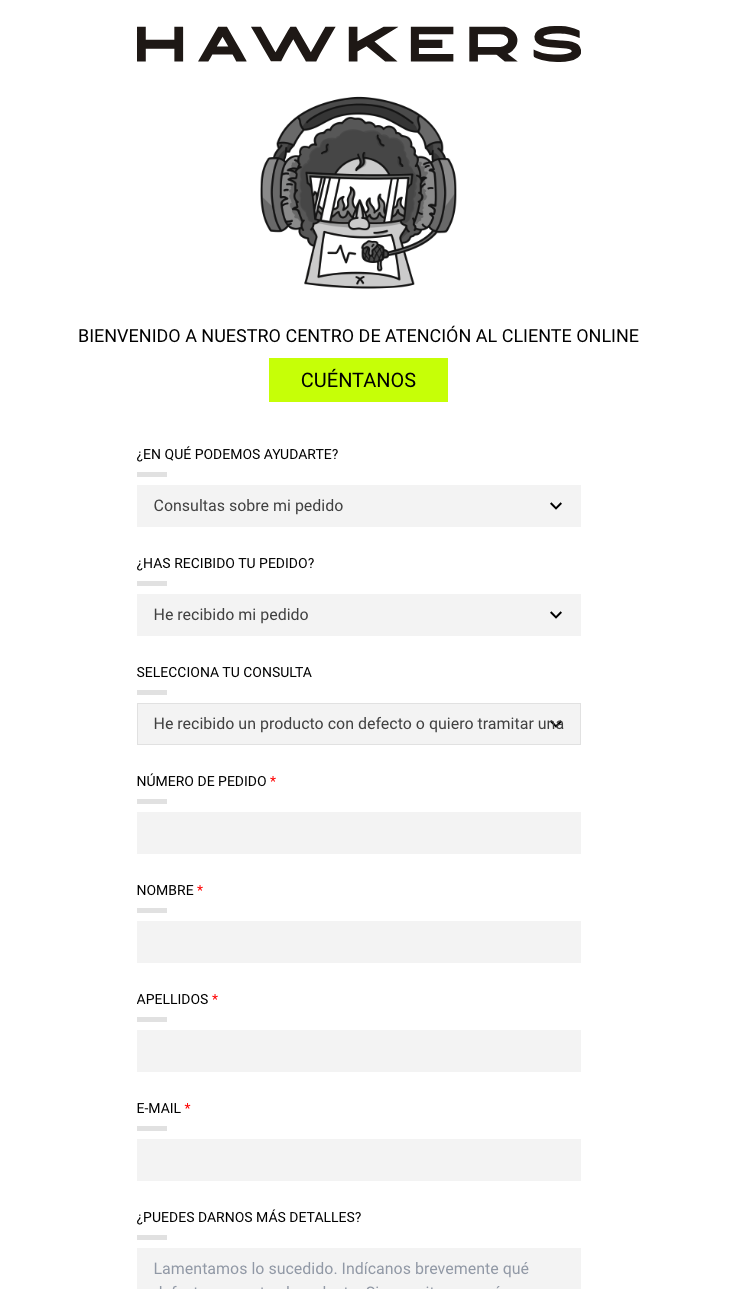
Widget que configura completamente la página de formulario de contacto de la tienda. Gestiona textos, imágenes, el árbol de preguntas guiadas y los campos del formulario, que se envían a Salesforce Service Cloud (WebToCase). El formulario es un componente Vue que guía al usuario en hasta tres niveles de preguntas antes de mostrar el formulario o un bloque de información relevante.
Vista previa
Comportamiento
-
Flujo guiado de 3 niveles: El usuario elige una categoría (primer desplegable →
contain.steps), luego una subcategoría (segundo desplegable →step.answers) y, si aplica, una opción adicional (tercer desplegable →answer.inner_answers). -
Formulario dinámico o bloque informativo: En función de las propiedades
has_formyshow_info_textde la opción seleccionada, el componente puede mostrar tres comportamientos distintos:has_formshow_info_textResultado truefalseMuestra el formulario. El campo descriptionactúa como placeholder del textarea.truetrueMuestra el bloque informativo ( description) y el formulario debajo.falsetrueMuestra solo el bloque informativo ( description). No hay formulario. -
Campos filtrados por
in_form: Cuando se muestra el formulario, solo aparecen los campos cuyoidesté listado en el arrayin_formde la opción elegida. El array globalformactúa como catálogo; se reutilizan los mismos campos en todas las opciones que los necesiten. -
Envío estándar (WebToCase): Todos los envíos utilizan HTTP POST a
urls.form. El campofileexiste en la estructura pero en la versión actual siempre esfalse. -
Pantalla de confirmación: Cuando la URL contiene
?sended=ok, el componente muestra la imagen de mujer y el mensajetexts.thanksen lugar del formulario. -
Textos e imágenes internacionalizables: Cada locale tiene su propio content asset con sus propios textos e imágenes.
Configuración
Content Asset
El widget se configura mediante un JSON en Business Manager → Content Assets. El ID del content asset se asigna como página de contenido de SFCC y se accede a través de $url('Page-Show', 'cid', 'contact')$.
{
  "images": {
    "logo_hawk": "pages/contact-form/img/logo-hawkers-black.svg?$staticlink$",
    "logo_img_man": "pages/contact-form/img/logo-contact-man.png?$staticlink$",
    "logo_img_woman": "pages/contact-form/img/logo-contact-woman.png?$staticlink$"
  },
  "texts": {
    "intro": "WELCOME TO OUR CUSTOMER SERVICE CONTACT FORM",
    "intro_button": "WHAT'S YOUR QUERY?",
    "select_first_question": "How can we help you?",
    "select_second_question": "Have you received your order?",
    "select_third_question": "SELECT THE REASON FOR YOUR INQUIRY",
    "select_fourth_question": "SELECT THE REASON FOR YOUR RETURN",
    "send_button": "SUBMIT",
    "thanks": "<strong>Thank you for contacting us!</strong><br>We have received your message and sent you a confirmation email. If you can't find it, please check your spam or promotions folders.<br>We will contact you as soon as possible.",
    "disabled_option": "None",
    "brand": "Hawkers",
    "max_size_files": "Max. file size: 15MB",
    "pending": "Customer Service",
    "received": "hk_received",
    "not_received": "hk_not_received",
    "org_id": "00D0Y000000qrxB"
  },
  "contain": {
    "name": "Class_case__c",
    "subname": "Subject_case__c",
    "refund_reason": "Return_reason_case__c",
    "steps": [
      {
        "question": "Inquiries about my order",
        "id": "hk_order",
        "value": "ORDER",
        "answers": [
          {
            "title": "I haven't received my order",
            "id": "hk_not_received",
            "value": "NOT_RECEIVED",
            "inner_answers": [
              {
                "title": "I haven't received the order confirmation email",
                "id": "NOT_RECEIVED_CONFIRMATION_EMAIL",
                "value": "NOT_RECEIVED_CONFIRMATION_EMAIL",
                "type": "INCIDENCE",
                "description": "✉️ The confirmation email may take up to <strong>10 minutes to arrive</strong>. If you don't see it in your inbox, please also check your <strong>spam or promotions</strong> folders.<br><br>👉 If you still haven't received it after that time, please complete the following form so we can help you.",
                "has_form": true,
                "show_info_text": true,
                "in_form": ["00N0Y00000PJFge", "00N0Y00000PJFgR", "email", "description", "legal_terms", "00N1i000001xaMZ"],
                "select_options": [],
                "file": false
              },
              {
                "title": "Check the status of my order",
                "id": "NOT_RECEIVED_TRACKING",
                "value": "NOT_RECEIVED_TRACKING",
                "type": "INCIDENCE",
                "description": "Track the status of your order through <a class='tw-text-blue tw-underline' href='$httpsURL('Order-ShowTracking')$'>this link</a>",
                "has_form": false,
                "show_info_text": true,
                "in_form": ["Numero_de_Pedido__c", "00N0Y00000PJFge", "00N0Y00000PJFgR", "email", "legal_terms", "00N1i000001xaMZ"],
                "select_options": [],
                "file": false
              },
              {
                "title": "Problem with the delivery of my order",
                "id": "NOT_RECEIVED_ORDER",
                "value": "NOT_RECEIVED_ORDER",
                "type": "INCIDENCE",
                "description": "",
                "has_form": true,
                "show_info_text": false,
                "in_form": ["Numero_de_Pedido__c", "00N0Y00000PJFge", "00N0Y00000PJFgR", "email", "description", "legal_terms", "00N1i000001xaMZ"],
                "select_options": [],
                "file": false
              },
              {
                "title": "I need to change the delivery address or details",
                "id": "CHANGE_ORDER_ADDRESS",
                "value": "CHANGE_ORDER_ADDRESS",
                "type": "REQUEST",
                "description": "We will do everything possible to manage the change of address. Please tell us which details you need to change (postcode, street, telephone number, etc.).",
                "has_form": true,
                "show_info_text": false,
                "in_form": ["Numero_de_Pedido__c", "00N0Y00000PJFge", "00N0Y00000PJFgR", "email", "description", "legal_terms", "00N1i000001xaMZ"],
                "select_options": [],
                "file": false
              },
              {
                "title": "I want to change or remove items from my order",
                "id": "MODIFY_ORDER_PRODUCTS",
                "value": "MODIFY_ORDER_PRODUCTS",
                "type": "REQUEST",
                "description": "We will do everything possible to manage the change of products in your order. Please tell us which product(s) you wish to exchange and for which product(s).",
                "has_form": true,
                "show_info_text": false,
                "in_form": ["Numero_de_Pedido__c", "00N0Y00000PJFge", "00N0Y00000PJFgR", "email", "description", "legal_terms", "00N1i000001xaMZ"],
                "select_options": [],
                "file": false
              }
            ]
          },
          {
            "title": "I have received my order",
            "id": "hk_received",
            "value": "RECEIVED",
            "inner_answers": [
              {
                "title": "A product is missing or I received the wrong one",
                "id": "RECEIVED_ORDER_WRONG",
                "value": "RECEIVED_ORDER_WRONG",
                "type": "INCIDENCE",
                "description": "Sorry for the inconvenience. Let us know which item is missing or incorrect. If needed, we'll request further details.",
                "has_form": true,
                "show_info_text": false,
                "in_form": ["Numero_de_Pedido__c", "00N0Y00000PJFge", "00N0Y00000PJFgR", "email", "description", "legal_terms", "00N1i000001xaMZ"],
                "select_options": [],
                "file": false
              },
              {
                "title": "I received a defective product or want to file a warranty claim",
                "id": "RECEIVED_PRODUCT_DEFECT",
                "value": "RECEIVED_PRODUCT_DEFECT",
                "type": "INCIDENCE",
                "description": "We're sorry about this. Please briefly describe the defect. If we need more information, we'll request it from you.",
                "has_form": true,
                "show_info_text": false,
                "in_form": ["Numero_de_Pedido__c", "00N0Y00000PJFge", "00N0Y00000PJFgR", "email", "description", "legal_terms", "00N1i000001xaMZ"],
                "select_options": [],
                "file": false
              },
              {
                "title": "I received my order correctly, but I want to know how to return it",
                "id": "RECEIVED_ORDER_REFUND",
                "value": "RECEIVED_ORDER_REFUND",
                "type": "REQUEST",
                "description": "Manage your return quickly and easily through our portal:<br><br>👉 <a class='tw-text-blue tw-underline' href='https://returns.hawkersco.com/'>Access the returns portal</a>",
                "has_form": false,
                "show_info_text": true,
                "in_form": ["Numero_de_Pedido__c", "00N0Y00000PJFge", "00N0Y00000PJFgR", "email", "description", "legal_terms", "00N1i000001xaMZ"],
                "select_options": [],
                "file": false
              },
              {
                "title": "Check the status of my refund",
                "id": "NOT_RECEIVED_REFUND",
                "value": "NOT_RECEIVED_REFUND",
                "type": "INCIDENCE",
                "description": "",
                "has_form": true,
                "show_info_text": false,
                "in_form": ["Numero_de_Pedido__c", "00N0Y00000PJFge", "00N0Y00000PJFgR", "email", "description", "legal_terms", "00N1i000001xaMZ"],
                "select_options": [],
                "file": false
              },
              {
                "title": "Request an invoice",
                "id": "CUSTOMER_INVOICE",
                "value": "CUSTOMER_INVOICE",
                "type": "REQUEST",
                "description": "If you want the invoice to be in your name, we need your National ID Number. If you prefer it to be in the name of a business, we will need your Tax ID Number. Also, don't forget to confirm your billing address.",
                "has_form": true,
                "show_info_text": false,
                "in_form": ["Numero_de_Pedido__c", "00N0Y00000PJFge", "00N0Y00000PJFgR", "email", "description", "legal_terms", "00N1i000001xaMZ"],
                "select_options": [],
                "file": false
              }
            ]
          }
        ]
      },
      {
        "question": "Other type of request",
        "id": "hk_info",
        "value": "OTHER",
        "answers": [
          {
            "title": "I can't access my account",
            "id": "OTHER_ACCOUNT_PROBLEM",
            "value": "OTHER_ACCOUNT_PROBLEM",
            "type": "QUESTION",
            "description": "To access your account, we recommend resetting your password. If the problem persists, tell us the error message you are receiving.",
            "has_form": true,
            "show_info_text": false,
            "in_form": ["00N0Y00000PJFge", "00N0Y00000PJFgR", "email", "description", "legal_terms", "00N1i000001xaMZ"],
            "select_options": [],
            "file": false
          },
          {
            "title": "I've had an issue with payment or can't complete my purchase",
            "id": "OTHER_PAYMENT_PROBLEM",
            "value": "OTHER_PAYMENT_PROBLEM",
            "type": "QUESTION",
            "description": "Let us know the error or issue you're experiencing while completing your purchase or making the payment, and which products you're trying to buy.",
            "has_form": true,
            "show_info_text": false,
            "in_form": ["00N0Y00000PJFge", "00N0Y00000PJFgR", "email", "description", "legal_terms", "00N1i000001xaMZ"],
            "select_options": [],
            "file": false
          },
          {
            "title": "I can't apply a promo code or discount",
            "id": "OTHER_PROMO_DISCOUNT",
            "value": "OTHER_PROMO_DISCOUNT",
            "type": "QUESTION",
            "description": "To help you with the discount code, tell us the code you are trying to use, the error you encounter (if there is one) and the products you want to buy.",
            "has_form": true,
            "show_info_text": false,
            "in_form": ["00N0Y00000PJFge", "00N0Y00000PJFgR", "email", "description", "legal_terms", "00N1i000001xaMZ"],
            "select_options": [],
            "file": false
          },
          {
            "title": "Inquiry about product availability",
            "id": "OTHER_PRODUCT_STOCK",
            "value": "OTHER_PRODUCT_STOCK",
            "type": "QUESTION",
            "description": "To help you to find the model you are looking for, please tell us the product name or reference.",
            "has_form": true,
            "show_info_text": false,
            "in_form": ["00N0Y00000PJFge", "00N0Y00000PJFgR", "email", "description", "legal_terms", "00N1i000001xaMZ"],
            "select_options": [],
            "file": false
          },
          {
            "title": "Information about the return policy",
            "id": "OTHER_RETURN_POLICY_INFO",
            "value": "OTHER_RETURN_POLICY_INFO",
            "type": "QUESTION",
            "description": "<p>Returns are managed at <a href='https://returns.hawkersco.com/' target='_blank'>returns.hawkersco.com</a>. Refunds are issued within 1–10 business days.</p>",
            "has_form": false,
            "show_info_text": true,
            "in_form": ["00N0Y00000PJFge", "00N0Y00000PJFgR", "email", "description", "legal_terms", "00N1i000001xaMZ"],
            "select_options": [],
            "file": false
          },
          {
            "title": "Information about a product's features",
            "id": "OTHER_INFO_PRODUCT_FEATURES",
            "value": "OTHER_INFO_PRODUCT_FEATURES",
            "type": "QUESTION",
            "description": "Let us know the product or model you're asking about and the specific details you want to know (size, shape, material, dimensions, etc.).",
            "has_form": true,
            "show_info_text": false,
            "in_form": ["00N0Y00000PJFge", "00N0Y00000PJFgR", "email", "description", "legal_terms", "00N1i000001xaMZ"],
            "select_options": [],
            "file": false
          },
          {
            "title": "Other inquiry not related to an order",
            "id": "OTHER_QUERY",
            "value": "OTHER_QUERY",
            "type": "QUESTION",
            "description": "Explain in detail what you need to know or resolve and we will help you to solve the issue.",
            "has_form": true,
            "show_info_text": false,
            "in_form": ["00N0Y00000PJFge", "00N0Y00000PJFgR", "email", "description", "legal_terms", "00N1i000001xaMZ"],
            "select_options": [],
            "file": false
          }
        ]
      }
    ]
  },
  "form": [
    {
      "id": "Numero_de_Pedido__c",
      "title": "Order number",
      "type": "text",
      "name": "Numero_de_Pedido__c",
      "maxLength": 100,
      "value": "",
      "class": "c-form__field",
      "rows": 0,
      "required": true,
      "placeholder": ""
    },
    {
      "id": "00N0Y00000PJFge",
      "title": "Name",
      "type": "text",
      "name": "00N0Y00000PJFge",
      "maxLength": 100,
      "value": "",
      "class": "c-form__field",
      "rows": 0,
      "required": true,
      "placeholder": ""
    },
    {
      "id": "00N0Y00000PJFgR",
      "title": "Surname",
      "type": "text",
      "name": "00N0Y00000PJFgR",
      "maxLength": 100,
      "value": "",
      "class": "c-form__field",
      "rows": 0,
      "required": true,
      "placeholder": ""
    },
    {
      "id": "email",
      "title": "E-Mail",
      "type": "email",
      "name": "email",
      "maxLength": 80,
      "value": "",
      "class": "c-form__field",
      "rows": 0,
      "required": true,
      "placeholder": ""
    },
    {
      "id": "description",
      "title": "PLEASE GIVE US MORE DETAILS",
      "type": "textarea",
      "name": "description",
      "maxLength": 400,
      "value": "",
      "class": "c-form__field",
      "rows": 4,
      "required": false,
      "placeholder": ""
    },
    {
      "id": "legal_terms",
      "title": "I have read and accept HAWKERS' <a href=$url('Page-Show', 'cid', 'privacy-policy')$ target='_blank'>privacy policy</a> and the <a href=$url('Page-Show', 'cid', 'terms')$ target='_blank'>terms and conditions</a>",
      "type": "checkbox",
      "name": "legal_terms",
      "maxLength": "",
      "value": 1,
      "class": "c-form__checkbox",
      "rows": 0,
      "required": true,
      "placeholder": ""
    },
    {
      "id": "00N1i000001xaMZ",
      "title": "I agree to receive commercial information from HAWKERS group and from other companies they collaborate with",
      "type": "checkbox",
      "name": "00N1i000001xaMZ",
      "maxLength": "",
      "value": 1,
      "class": "c-form__checkbox",
      "rows": 0,
      "required": false,
      "placeholder": ""
    }
  ],
  "urls": {
    "form": "https://webto.salesforce.com/servlet/servlet.WebToCase?encoding=UTF-8",
    "formFiles": "https://saldum.my.salesforce.com/servlet/servlet.WebToCase?encoding=UTF-8",
    "lightningComponent": "https://saldum.my.salesforce-sites.com/WEBTOCASEDEMOcodemsio"
  }
}
Propiedades
images
| Propiedad | Tipo | Obligatorio | Descripción |
|---|---|---|---|
images.logo_hawk | string | Sí | Ruta al logo de Hawkers mostrado en la cabecera. Debe terminar en ?$staticlink$. |
images.logo_img_man | string | Sí | Imagen decorativa de hombre, visible antes de que el usuario pulse el botón inicial. |
images.logo_img_woman | string | Sí | Imagen decorativa de mujer, visible en la pantalla de confirmación post-envío. |
texts
| Propiedad | Tipo | Obligatorio | Descripción |
|---|---|---|---|
texts.intro | string | Sí | Texto de bienvenida mostrado sobre el botón inicial. |
texts.intro_button | string | Sí | Texto del botón que despliega el formulario. |
texts.select_first_question | string | Sí | Etiqueta del primer desplegable (categoría). |
texts.select_second_question | string | Sí | Etiqueta del segundo desplegable (subcategoría para hk_order). |
texts.select_third_question | string | Sí | Etiqueta del tercer desplegable (opción) y del segundo para hk_info. |
texts.select_fourth_question | string | No | Etiqueta del cuarto desplegable (motivo de devolución). Reservado, actualmente no activo. |
texts.send_button | string | Sí | Texto del botón de envío del formulario. |
texts.thanks | string | Sí | Mensaje HTML mostrado en la pantalla de confirmación tras enviar el formulario. |
texts.disabled_option | string | Sí | Texto de la opción deshabilitada por defecto en todos los desplegables. |
texts.brand | string | Sí | Valor del campo oculto Brand__c enviado a Salesforce (ej. "Hawkers"). |
texts.max_size_files | string | No | Texto informativo sobre el tamaño máximo de archivos adjuntos (ej. "Max. file size: 15MB"). |
texts.pending | string | Sí | Valor del campo oculto SS_Pending__c enviado a Salesforce. |
texts.received | string | Sí | ID del paso hk_received para identificarlo internamente. |
texts.not_received | string | Sí | ID del paso hk_not_received para identificarlo internamente. |
texts.org_id | string | Sí | ID de organización de Salesforce. Se envía como campo oculto orgid al hacer POST. |
contain
| Propiedad | Tipo | Obligatorio | Descripción |
|---|---|---|---|
contain.name | string | Sí | Nombre del campo POST que recoge la categoría principal (ej. "Class_case__c"). |
contain.subname | string | No | Nombre del campo POST para el asunto/subcategoría (ej. "Subject_case__c"). |
contain.refund_reason | string | No | Nombre del campo POST para el motivo de devolución (ej. "Return_reason_case__c"). |
contain.steps | array | Sí | Array de categorías de primer nivel del formulario. |
contain.steps[]
| Propiedad | Tipo | Obligatorio | Descripción |
|---|---|---|---|
question | string | Sí | Texto visible en el primer desplegable. |
id | string | Sí | Identificador interno. Condiciona la lógica del formulario: "hk_order" o "hk_info". |
value | string | Sí | Valor enviado a Salesforce como categoría (ej. "ORDER", "OTHER"). |
answers | array | Sí | Subcategorías que aparecen en el segundo desplegable. |
contain.steps[].answers[]
| Propiedad | Tipo | Obligatorio | Descripción |
|---|---|---|---|
title | string | Sí | Texto visible en el segundo desplegable. |
id | string | Sí | Identificador interno de la respuesta. |
value | string | Sí | Valor usado como asunto en Salesforce. |
type | string | Sí | Tipo de caso Salesforce: "INCIDENCE", "REQUEST" o "QUESTION". |
description | string | No | Texto HTML informativo. Según show_info_text, se muestra como bloque visible o como placeholder del textarea. |
show_info_text | boolean | Sí | Si true, renderiza description como bloque informativo visible encima del formulario (o en su lugar si has_form es false). |
has_form | boolean | Sí | Si true, muestra el formulario con los campos de in_form. |
in_form | array | Sí | Array de IDs de campos del catálogo global form que se mostrarán para esta selección. |
file | boolean | Sí | Reservado para integración con Lightning de Salesforce. Actualmente siempre false. |
select_options | array | No | Opciones de un cuarto desplegable (motivo de devolución). Reservado, actualmente no activo en el componente. |
inner_answers | array | No | Tercer nivel de opciones, disponible solo para hk_order. Tiene las mismas propiedades que answers[] (excepto inner_answers anidado). |
form
Catálogo global de todos los campos disponibles. Se definen una sola vez y se reutilizan por referencia en in_form.
| Propiedad | Tipo | Obligatorio | Descripción |
|---|---|---|---|
id | string | Sí | Identificador único del campo. Se referencia en in_form. |
title | string | Sí | Etiqueta visible del campo. Admite HTML (útil para los checkboxes con enlaces legales). |
type | string | Sí | Tipo de campo: "text", "email", "textarea" o "checkbox". |
name | string | Sí | Nombre del campo POST enviado a Salesforce (ID de campo API o nombre estándar). |
maxLength | number | No | Longitud máxima (aplica a text, email y textarea). |
value | string|number | No | Valor por defecto. En checkboxes, el valor enviado al marcar (ej. 1). |
class | string | No | Clase CSS del campo (ej. "c-form__field", "c-form__checkbox"). |
rows | number | No | Número de filas visibles (solo para textarea). |
required | boolean | Sí | Si true, el campo es obligatorio y se marca con asterisco rojo. |
placeholder | string | No | Placeholder del campo. Puede sobreescribirse con el description de la opción seleccionada. |
Campos definidos actualmente
id | Campo Salesforce | Tipo | Obligatorio | Descripción |
|---|---|---|---|---|
Numero_de_Pedido__c | Numero_de_Pedido__c | text | Sí | Número de pedido. |
00N0Y00000PJFge | 00N0Y00000PJFge | text | Sí | Nombre del cliente. |
00N0Y00000PJFgR | 00N0Y00000PJFgR | text | Sí | Apellidos del cliente. |
email | email | email | Sí | Correo electrónico. |
description | description | textarea | No | Campo de texto libre para detalles. |
legal_terms | legal_terms | checkbox | Sí | Aceptación de política de privacidad y T&C. |
00N1i000001xaMZ | 00N1i000001xaMZ | checkbox | No | Consentimiento para comunicaciones comerciales. |
urls
| Propiedad | Tipo | Obligatorio | Descripción |
|---|---|---|---|
urls.form | string | Sí | Endpoint de Salesforce WebToCase para el envío estándar del formulario. |
urls.formFiles | string | Sí | Endpoint alternativo de Salesforce para envíos con archivos adjuntos (reservado). |
urls.lightningComponent | string | Sí | URL del componente Lightning de Salesforce para adjuntos (reservado, no activo). |
Notas y consejos
- Plantilla
- Componente Vue
- JSONs por locale
pages/contact.isml
page-generator-vue/views/PageContactForm.vue
Los JSONs de referencia por mercado están en:
help/landing-pages/contact-form/contact-form-[locale].json
Locales disponibles: es, en, fr, de, it, pt, mx, co, el, gr.
- Añade el campo al catálogo global
formcon unidúnico. - Referencia ese
iden el arrayin_formde las opciones donde deba aparecer. - No es necesario duplicar la definición: un mismo campo puede usarse en múltiples opciones.
Configura has_form: false y show_info_text: true. El description puede contener HTML enriquecido con enlaces, listas o estilos Tailwind. Úsalo para opciones como "Política de devoluciones" o "Estado del pedido" donde basta con redirigir al usuario:
{
  "has_form": false,
  "show_info_text": true,
  "description": "Gestiona tu devolución en <a href='https://returns.hawkersco.com/'>nuestro portal</a>."
}
Todas las rutas de imágenes deben terminar en ?$staticlink$ para que SFCC resuelva correctamente la ruta estática del cartucho.
Los IDs de campos como 00N0Y00000PJFge (Nombre) o Numero_de_Pedido__c son identificadores de campos API de Salesforce Service Cloud. Cambiarlos sin coordinarlo con el equipo de Salesforce hará que los datos no se guarden en el CRM.